Invoice Generator &Free Invoice Maker
Create a professional invoice in under 2 minutes - pick a template, add your details, and download the PDF instantly.
No subscription. No sign-up required. Used by freelancers, contractors, and small businesses worldwide.
PNG, JPG, or SVG. Max 2MB.
PNG, JPG, or SVG. Max 2MB.
Get Started in 3 Steps
How Do You Create an Invoice Online?
Create an invoice online in 3 steps: open the invoice maker, enter business and client details with line items, and download the PDF - no sign-up, no software installation, no templates to download.
Open the invoice maker
Go to createinvoices.net/create. No account needed - the invoice generator loads instantly.
Enter your details
Add your business name, client details, invoice number, issue date, due date, and line items.
Download your invoice PDF
Choose a template, set brand colors, upload your logo, and click Download PDF.
7 Key Parts of a Professional Invoice
Every invoice CreateInvoices generates includes all essential sections — so you never miss a field that could delay payment. Hover the markers to explore each part.
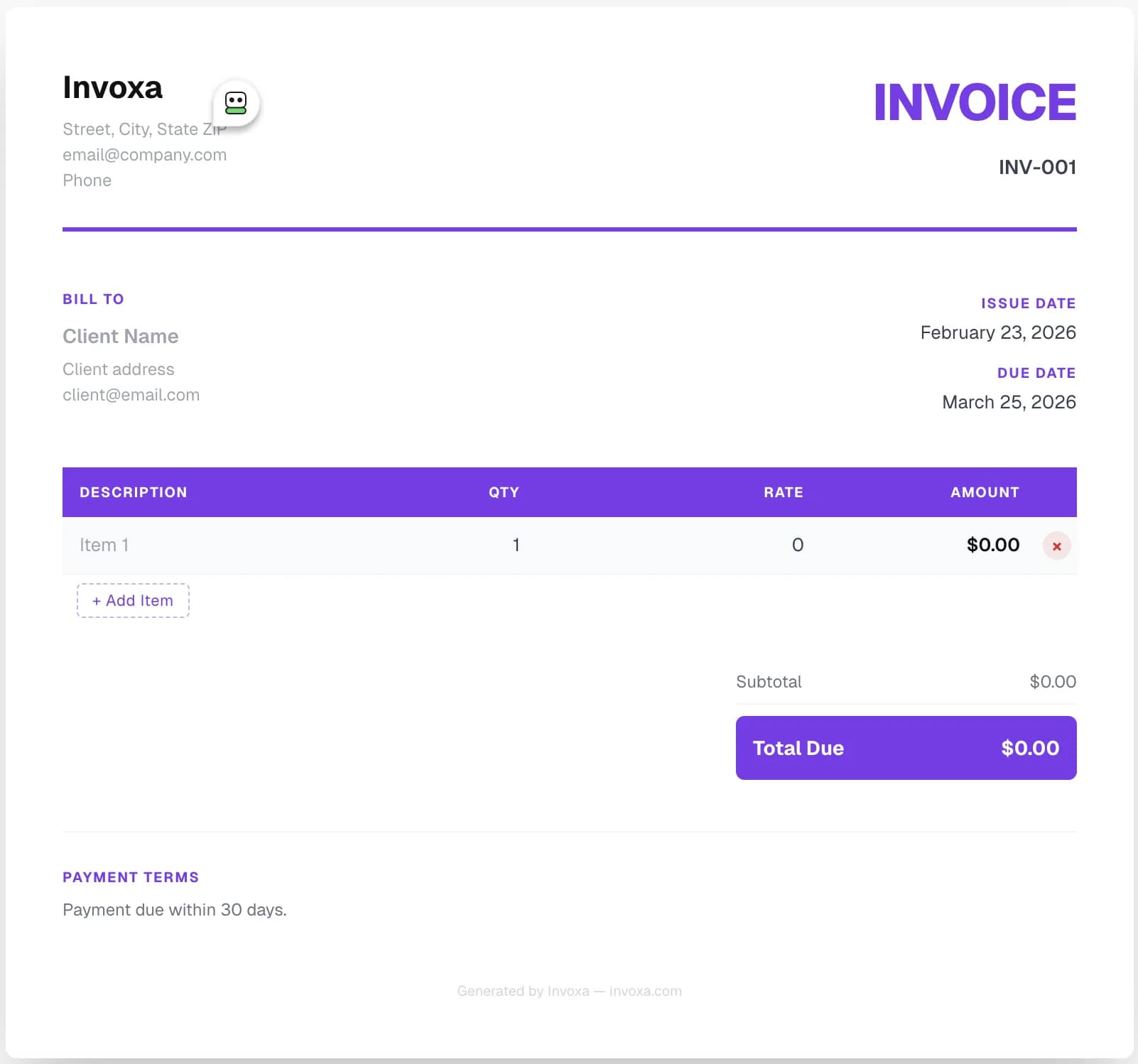
Your Business Details
Add your company name, address, email, phone number, and upload your logo.
Invoice Number
Auto-generated or custom invoice number to track and reference each invoice.
Client Information
Client name, billing address, and email — pulled into every PDF automatically.
Issue & Due Date
Set the invoice date and payment due date. Overdue invoices are flagged automatically.
Line Items
Add unlimited services or products with description, quantity, and unit rate. Totals calculate live.
Subtotal & Total Due
Subtotal, tax (VAT / GST), discounts, and the grand total — all auto-calculated.
Notes & Payment Terms
Add bank details, payment instructions, or any terms and conditions for your client.
Your Business Details
Company name, address, email, phone number, and logo — identifies you as the sender.
Invoice Number
A unique identifier to track and reference each invoice. Auto-generated or fully custom.
Client Information
Client name, billing address, and email — the Bill To section on every invoice.
Issue & Due Date
The date the invoice was sent and the payment deadline. Overdue invoices are flagged automatically.
Line Items
Unlimited services or products with description, quantity, and unit rate. Totals calculate live.
Subtotal & Total Due
Subtotal, tax (VAT / GST), discounts, and the grand total — all auto-calculated instantly.
Notes & Payment Terms
Bank details, payment instructions, or any terms and conditions for your client.
12 Free Templates
Which Invoice Templates Does CreateInvoices Include?
CreateInvoices includes 12 free invoice templates: Classic, Executive, Freelancer, Creative, Startup, Minimal, and more. Every template supports a custom accent color and logo upload. Select any template to open it in the invoice maker.
Classic
Clean & professional
Executive
Dark sidebar, formal
Enterprise
Bold corporate header
Startup
Modern gradient
Bold
Dark, high-impact
Elegant
Refined & premium
Freelancer
Personal & minimal
Consultant
Solo professional
Personal
Warm & approachable
Creative
Bold & artistic
Minimal
Ultra clean
Receipt
Compact receipt
Broadsheet
Newspaper-style masthead
Horizon
Bold header, colored table
Nordic
Minimal with accent bar
Vivid
Colorful geometric corners
Atlas
Teal header, numbered rows
Built-In Features
What Does This Free Invoice Generator Include?
CreateInvoices is a full-featured invoice maker - with templates, currency support, tax, discounts, logo upload, and PDF download - all free, no subscription required.
Instant PDF Invoice
Generate a professional PDF invoice in seconds. No formatting, no spreadsheets.
No Sign-up Required
Use the free invoice generator without creating an account.
30+ Currencies
USD, EUR, GBP, INR, and 26 more. Search by currency name or code.
12 Invoice Templates
Classic, Executive, Freelancer, Creative, Minimal - pick your style.
Secure & Private
Your invoice data stays private. No data sold, no third-party tracking.
Save & Revisit
Sign in free to save invoices and edit or resend them anytime.
Tax & Discount Support
Add multiple tax rates (VAT, GST) and percentage or flat discounts.
Shareable Links
Share a direct link to your invoice with clients instead of attachments.
Who It's For
Who Uses This Invoice Generator?
CreateInvoices is used by freelancers, contractors, consultants, small businesses, and agencies who need a fast, free invoice maker without accounting software.
Freelancers & Self-Employed
Bill clients for design, writing, development, or any hourly or project-based service. Works for sole traders invoicing under their own name.
Freelance Invoice Generator →Contractors
Create compliant invoices for construction, electrical, plumbing, or trade work.
Contractor Invoice →Consultants
Invoice for advisory hours, strategy sessions, or fixed-scope engagements.
Consulting Invoice Template →Small Businesses
Send professional invoices for goods or services without expensive accounting software.
Commercial Invoice →Agencies
Bill clients for ongoing retainers, project work, or per-deliverable engagements.
Sales Invoice Template →Recurring Billers
Save invoice templates and duplicate them for monthly billing cycles in seconds.
Create Invoice →Invoice Types
What Types of Invoices Can You Create?
CreateInvoices supports every common invoice type - from standard business invoices to freelance invoices, contractor invoices, and receipts.
Standard Invoice
Commercial invoice for goods or services.
Freelance Invoice
Hourly or project-based billing for freelancers.
Sales Invoice
Sales and service billing for businesses.
Contractor Invoice
Construction or trade work with itemized costs.
Consulting Invoice
Advisory or strategy billing.
Receipt
Payment acknowledgment after a transaction.
Pro Forma Invoice
Preliminary estimate sent before work begins.
Tax Invoice
VAT/GST-compliant invoice for registered businesses.
Service Invoice
Itemized billing for professional services.
Overview
What Is an Invoice Generator?
An invoice generator is a web-based tool that builds formatted invoice documents from user-supplied data: business name, client details, line items, tax rates, and payment terms - and outputs a downloadable PDF. CreateInvoices produces a ready-to-send PDF in under 2 minutes.
Unlike Word or Sheets, an online invoice maker recalculates line totals, taxes, and discounts in real time as data is entered - no manual formulas or formatting required. Make an invoice in minutes, not hours.
This free invoice maker serves freelancers, self-employed professionals, contractors, consultants, and small businesses who need a fast, professional billing tool without an accounting software subscription.
Under 2 min
From open to PDF download
12 Templates
Classic, Freelancer, Minimal & more
Free Forever
No subscription, no sign-up
30+ Currencies
USD, EUR, GBP, INR and more
Required Fields
What Does a Valid Invoice Include?
A valid invoice includes the seller's name and contact information, the buyer's name and billing address, a unique invoice number, issue and due dates, a line-item breakdown, applicable tax rates, and the total amount due.
CreateInvoices includes fields for every required component. Invoice numbers auto-generate sequentially. Tax and discount fields accept both percentage and flat values.
Invoice number
Sequential ID such as INV-0042. Prevents duplicates and simplifies tracking.
Issue date
Date the invoice was created. Payment terms are counted from this date.
Due date
Payment deadline. Net 30 = full amount due 30 days after the issue date.
Seller details
Business name, address, email, phone, and optional TIN.
Client details
Client name, company, and billing address matching their AP records.
Line items
Each service or product with description, quantity, rate, and line total.
Subtotal
Sum of all line items before taxes and discounts are applied.
Tax
VAT, GST, or sales tax applied as a percentage of the subtotal.
Discount
Optional reduction as a percentage or flat amount.
Total due
Final amount owed after all taxes and discounts - what the client pays.
Payment Terms
What Are Standard Invoice Payment Terms?
Payment terms define when a client must pay. Net 30 is the most common term - full payment is due within 30 calendar days of the invoice issue date.
Add payment terms via the Notes or Payment Terms field in the invoice maker. CreateInvoices displays the due date on every PDF template.
Net 30
Payment due within 30 days. Standard for most B2B transactions - allows one billing cycle to process through Accounts Payable.
Net 15
Payment due within 15 days. Common for freelancers who need a shorter cash conversion cycle.
Net 7
Payment due within 7 days. Used for smaller invoices or clients with a fast-pay agreement.
Due on Receipt
Payment due immediately on receiving the invoice. Standard for one-time or prepaid engagements.
2/10 Net 30
A 2% early-payment discount if paid within 10 days; full amount due in 30 days otherwise.
Step-by-Step
How to Create a Professional Invoice
Enter business details, add client info, list services with quantities and rates, apply taxes and discounts, choose a template, and download - under 2 minutes start to finish.
Business info
Name, address, email, phone, and optional logo.
Client details
Client name, company, and billing address.
Invoice dates
Auto-generate invoice number, set issue and due dates.
Line items
Add services or products with quantity and rate.
Tax & discount
Apply VAT, GST, or a flat/percentage discount.
Download PDF
Pick a template, set accent color, export.
Comparison
Invoice vs Receipt
An invoice is a payment request issued before payment is collected; a receipt confirms payment after it is received. The two documents serve different accounting purposes and appear at different stages of a transaction.
CreateInvoices supports both. Use invoice templates for payment requests and the Receipt template for post-payment acknowledgment.
| Attribute | Invoice | Receipt |
|---|---|---|
| Purpose | Requests payment | Confirms payment received |
| Issued when | Before payment | After payment |
| Includes due date | Yes | No |
| Used for | Accounts Receivable (AR) tracking | Expense records & tax filing |
| Template type | Invoice template | Receipt template |
Comparison
CreateInvoices vs QuickBooks & FreshBooks
CreateInvoices is a free, standalone invoice generator with no subscription. QuickBooks and FreshBooks are paid accounting platforms where invoicing is one module within a broader system.
For professionals who only need to create and send invoices, CreateInvoices is the faster, free alternative. For full bookkeeping, payroll, or expense tracking, consider QuickBooks or Wave Accounting.
| Feature | CreateInvoices | QuickBooks | FreshBooks |
|---|---|---|---|
| Cost | $0 / month | From $30 / month | From $19 / month |
| Account required | No | Yes | Yes |
| PDF invoice | Yes | Yes | Yes |
| Expense tracking | No | Yes | Yes |
| Payroll | No | Add-on | No |
| Setup time | Under 2 minutes | 30–60 minutes | 15–30 minutes |
More Tools
Explore Invoice Templates by Type
FAQs
Frequently Asked Questions About Invoice Generators
Is this invoice generator really free?
How do I create an invoice online?
What is an invoice maker?
Do I need to sign up to use this free invoice generator?
Does CreateInvoices support multiple currencies?
How do I create invoices for freelance work?
Can I add my logo to the invoice?
What is Net 30 on an invoice?
How should invoices be numbered?
How do I draft an invoice?
Can I create an invoice without a company name?
How do I make an invoice on a phone or iPhone?
How do I collect payment on an invoice?
What is an online invoice maker?
Can self-employed people and sole traders use this tool?
What is a proforma invoice?
Can I create a VAT invoice or tax invoice?
How do I send an invoice to a client?
Ready to Create Your Invoice?
The fastest free invoice generator online. No sign-up, no credit card. Used by freelancers and businesses worldwide.
Create Invoice Now - FreeFree invoice generator · No sign-up · No credit card · Instant PDF